 Audio Tag Editor
 BPM Finder
 Live BPM Finder
 Key Finder
 Mix Maker
 Track Analyzer
 Transition Finder
 VST Manager
If you prep your music library on a Mac and you want BPM, key, and audio analysis data written to your files before a gig, you are likely looking at two tools: Track Analyzer and Mixed In Key. Both do batch analysis of audio libraries. Both detect BPM and key. Both write results to file metadata. The question is what the price difference actually buys you, and whether the extra features justify that cost for your specific workflow.
This is not a comparison where one tool is objectively better. They serve overlapping but distinct needs, and the right answer depends on whether your workflow requires what Mixed In Key specifically adds beyond the core analysis.
At a glance
Track Analyzer
Pros
- BPM, key, and danceability score in a single analysis pass
- Writes results to audio file metadata in under 1 second per track
- File renaming with custom patterns using BPM, key, title, and artist
- Spreadsheet export for filtering and sorting your library
Cons
- Mac only, no Windows version
- No energy level analysis
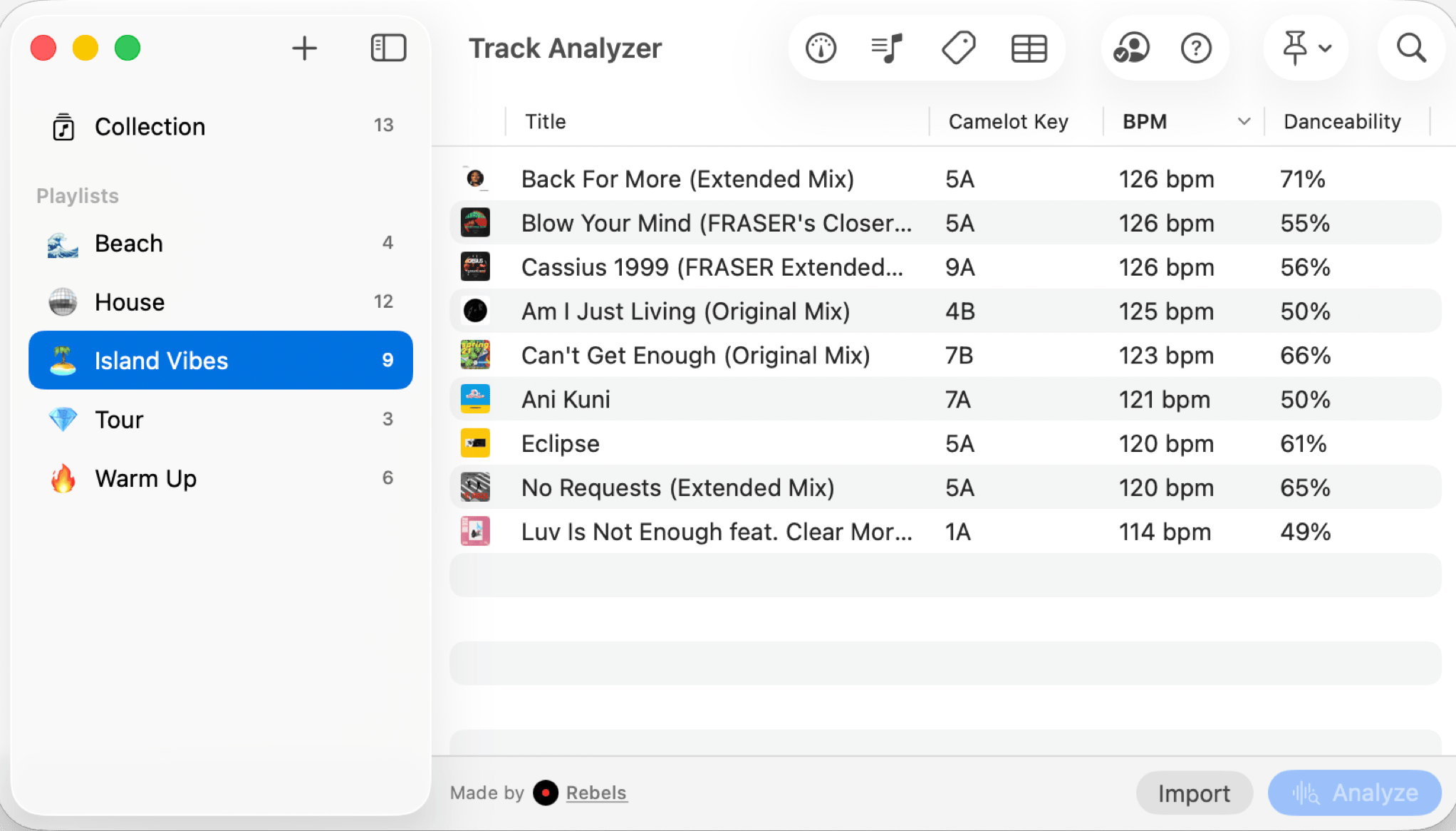
Track Analyzer runs a full analysis pass on your audio files in under 1 second per track, entirely on-device. It detects BPM, musical key with Camelot notation, and assigns a danceability score that rates how energetic and dance-floor-ready a track is. All three values can be written directly to each file's metadata in one click.
The features that set it apart from most analysis tools are the ones around file organization. The file renaming system lets you define custom templates using metadata variables: rename a folder of tracks to include BPM and key in the filename, so the information is visible in Finder without opening any app. The spreadsheet export lets you filter and sort your library by any combination of fields, which is useful for set planning or identifying tracks by tempo range and key at the same time.
Everything runs locally. No cloud, no account required, no analysis sent anywhere. For a DJ who manages music in Finder folders rather than a DJ platform library, Track Analyzer integrates into that workflow directly. At $7.99 one-time, the price is low enough that the analysis features pay for themselves quickly in time saved.
DJs who prep in Finder rather than DJ software and want fast BPM, key, and danceability analysis with file renaming and spreadsheet export at a low one-time price.
Mixed In Key 11
Pros
- Industry-standard BPM and key detection accuracy
- Energy levels, Camelot codes, and automatic cue points in one pass
- Available on both Mac and Windows
Cons
- Expensive if you only need BPM and key metadata writing
- No danceability score, or spreadsheet export
- No iPhone or iPad version
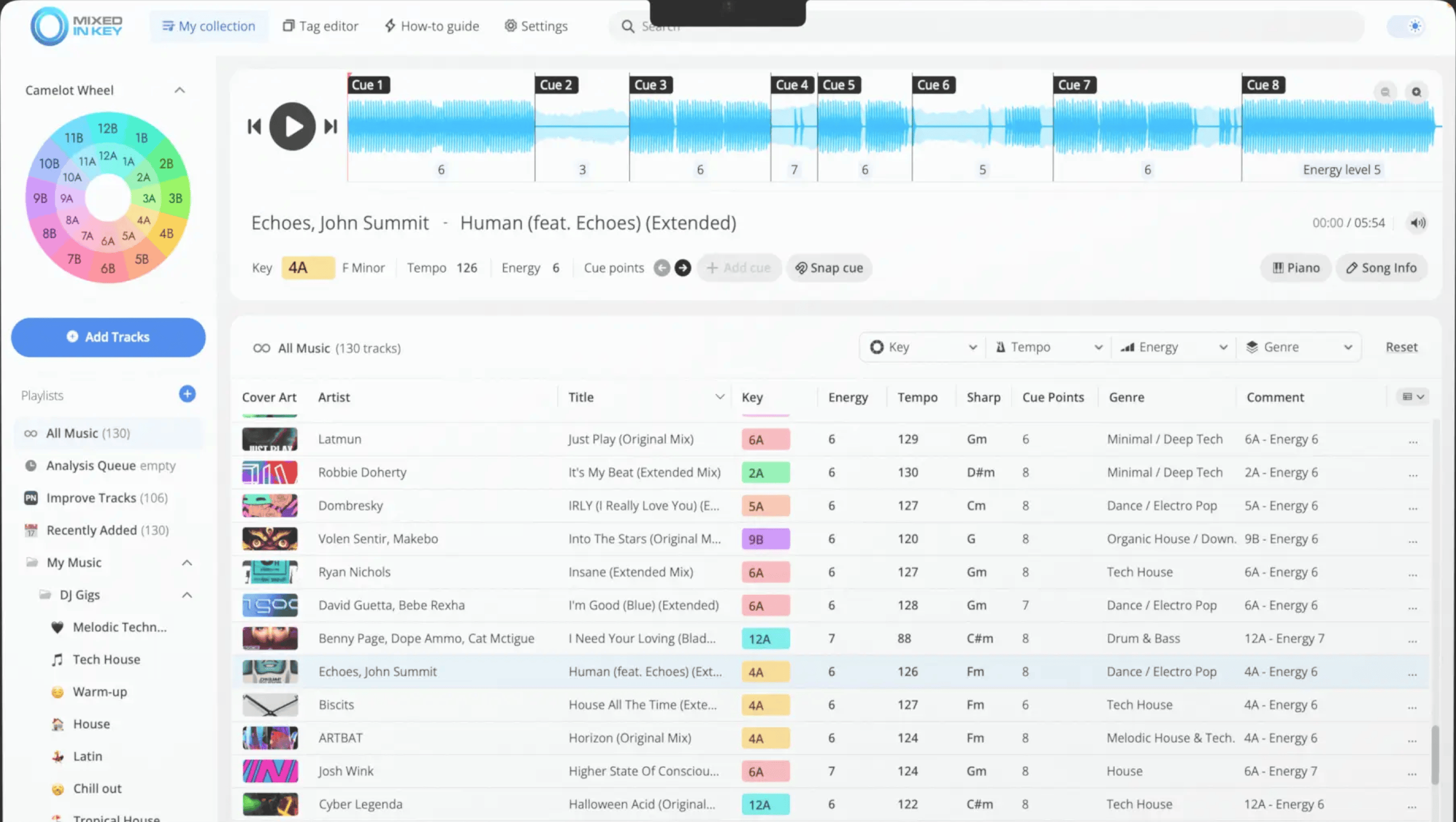
Mixed In Key 11 has been the industry reference for harmonic mixing preparation for nearly two decades. Its key detection accuracy is consistently rated among the highest available, and the analysis suite goes deep: BPM, musical key, Camelot harmonic codes, energy level ratings per track, and automatic cue points, all generated in a single batch pass.
The energy level feature is what most harmonic mixing workflows depend on beyond key alone. Knowing not just that two tracks are in compatible keys but also that one is high energy and one is a slow build changes how you sequence a set. Mixed In Key's ratings give you that data without manual labeling. The automatic cue points placed at phrased positions save significant time in software like Rekordbox, where placing cue points manually is a standard part of prep.
The DJ software export is the clearest differentiator from a dedicated analysis tool. Mixed In Key can push its results directly into Rekordbox and Serato libraries, so the energy, key, Camelot codes, and cue points appear in the software you are actually mixing with. That integration step, going from analysis to the DJ platform, is automated.
If your DJ workflow is Rekordbox or Serato-based and harmonic mixing is central to how you sequence sets, Mixed In Key earns its price. If you prep in Finder or manage music outside a DJ platform, the export integration is irrelevant and the price is harder to justify.
DJs whose workflow centers on Rekordbox or Serato who want energy levels, automatic cue points, and direct DJ software export alongside BPM and key.
Which one should you get?
The answer depends entirely on where your prep work happens.
If you manage your music in Finder folders and care primarily about having accurate BPM, key, and danceability information written to your files, Track Analyzer is the clear choice. $7.99 one-time is close to a no-brainer for what it delivers. The file renaming system and spreadsheet export are genuinely useful features, and the analysis is faster per track.
If your prep workflow runs through Rekordbox or Serato, and your sets are built around harmonic mixing with energy-rated track sequencing, Mixed In Key is worth the premium. The energy levels and automatic cue points save real time in that workflow, and the direct export into your DJ platform means less manual work. At $58, you are paying for integration depth and additional analysis features, and it is justified when those features are actually part of how you work.
There is no scenario where someone needs both. The data they produce overlaps almost entirely, and the workflow integrations are the meaningful differentiator. The question is which workflow is yours.
What I actually use
Track Analyzer for library prep. Track Analyzer runs through a new folder of tracks in seconds, writes BPM and key to the metadata, and the danceability score adds a useful filter when I am selecting tracks for a specific energy level.
For anyone locked into a Rekordbox or Serato workflow, Mixed In Key is the correct tool. The cue points and energy ratings integrate into exactly the prep process those platforms support, and the manual time saved during a library update is real.