 Audio Tag Editor
 BPM Finder
 Live BPM Finder
 Key Finder
 Mix Maker
 Track Analyzer
 Transition Finder
 VST Manager
OwlPlug is free, open source, and runs on Mac, Windows, and Linux. VST Manager costs $8.99. At first glance that looks like an easy comparison, but these two tools solve different problems, and picking the wrong one is mostly a matter of not understanding what each one is actually built to do.
This comparison is for Mac-based producers who want to get their plugin situation organized and need to know which tool is worth their time.
At a glance
The tools
VST Manager
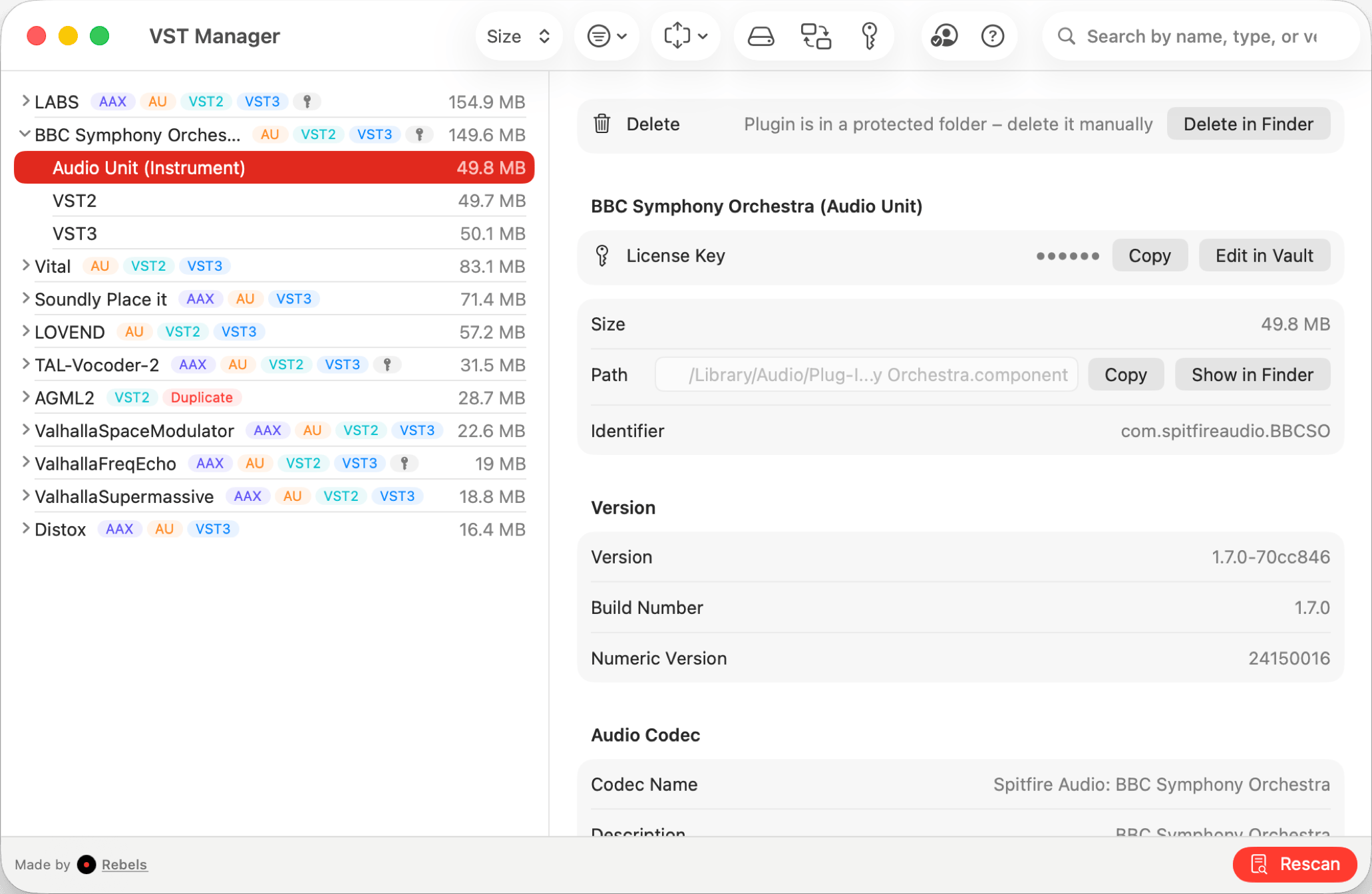
VST Manager is built around a question most producers with real plugin libraries eventually face: what do I actually have installed, where is all the duplicate junk, and where are my license keys? It scans your system for AAX, Audio Unit, VST, and VST3 plugins, gives you a unified view across formats, and flags anything installed in multiple locations or formats.
The license key vault is the feature that makes $8.99 an easy decision. It stores all your plugin serial numbers and activation codes in one place, synced through iCloud Keychain across your Macs. If you have spent a meaningful amount of money on plugins over the years, you know how fragile license management gets: emails buried in old inboxes, PDF receipts from three computers ago, activation codes on a machine you no longer own. Having them synced and searchable takes ten minutes to set up and saves hours in aggregate over time.
The system profile sharing feature is practical for producers who collaborate or work across studios. You can share a complete picture of your installed plugin setup, which makes it straightforward to identify what you have versus what a collaborator has before a session.
Mac producers who want to audit their existing plugin collection, eliminate duplicates, and protect their license keys across multiple machines.
OwlPlug

OwlPlug approaches the plugin problem from the other direction. On top of helping you manage what you already have, it helps you find and install new plugins. It connects to a community registry where developers publish their plugins, lets you browse and install directly, and supports customizable organization structures for how plugins are stored on your system.
It is fully open source with an active GitHub repository and a community Discord. The decentralized architecture means you can contribute plugins to the registry and install from third-party distribution services. For producers who are actively building a collection and want a centralized place to discover and manage installations, OwlPlug handles that workflow well and costs nothing.
Worth noting there is no duplicate detection, no license key vault, no storage breakdown, and no system profile sharing. If your plugin library is already large and the goal is to understand and clean up what you have rather than add more, OwlPlug does not really address that problem.
Producers on any platform who want a free, open-source tool for discovering and installing plugins from a community registry.
Which one should you get?
The simplest framing: OwlPlug is for quickly managing and building a plugin collection. VST Manager is for managing one you already have.
If you are new to production and actively adding plugins to a growing library, OwlPlug is the obvious choice: it is free, it handles installation, and the community registry is a useful discovery tool. There is no reason to spend $8.99 at this stage.
If you have years of plugin purchases behind you, a library spread across formats and locations, and license keys scattered across emails and PDFs, VST Manager pays for itself quickly. The duplicate scan alone usually turns up enough redundant installations to justify the price, and having your license keys in iCloud is the kind of peace of mind that is hard to value until the day you need it.
What I actually use
VST Manager, and I have not needed OwlPlug since I got my collection organized. My plugin library grew to the point where I genuinely did not know what was installed where, and the duplicate scan was worth $8.99 by itself. The license key vault is what I rely on now; I cleaned up license from three old computers and everything is in one place.
If I were starting over on a new machine and wanted to build a collection from scratch without spending anything, I would start with OwlPlug. But those are different problems, and the right tool depends on where you are in the process.