Audio Tag Editor
 BPM Finder
 Live BPM Finder
 Key Finder
 Mix Maker
 Track Analyzer
 Transition Finder
 VST Manager
A Mac with ten or fifteen plugins installed is easy to manage. A Mac with two hundred plugins, spread across four or five vendors, a handful of freeware sources, and whatever was installed three years ago and never removed, is a different situation. Plugins accumulate. DAWs slow down scanning folders full of outdated formats. Some plugins work on one machine but not another. An old VST2 that no longer has a manufacturer is sitting in your components folder and you don't know if it still loads.
The dedicated plugin manager category on Mac is thinner than you'd hope, but a few tools actually help. Here's what's worth using in 2026.
At a glance
The best VST plugin managers for Mac
VST Manager (best overall)
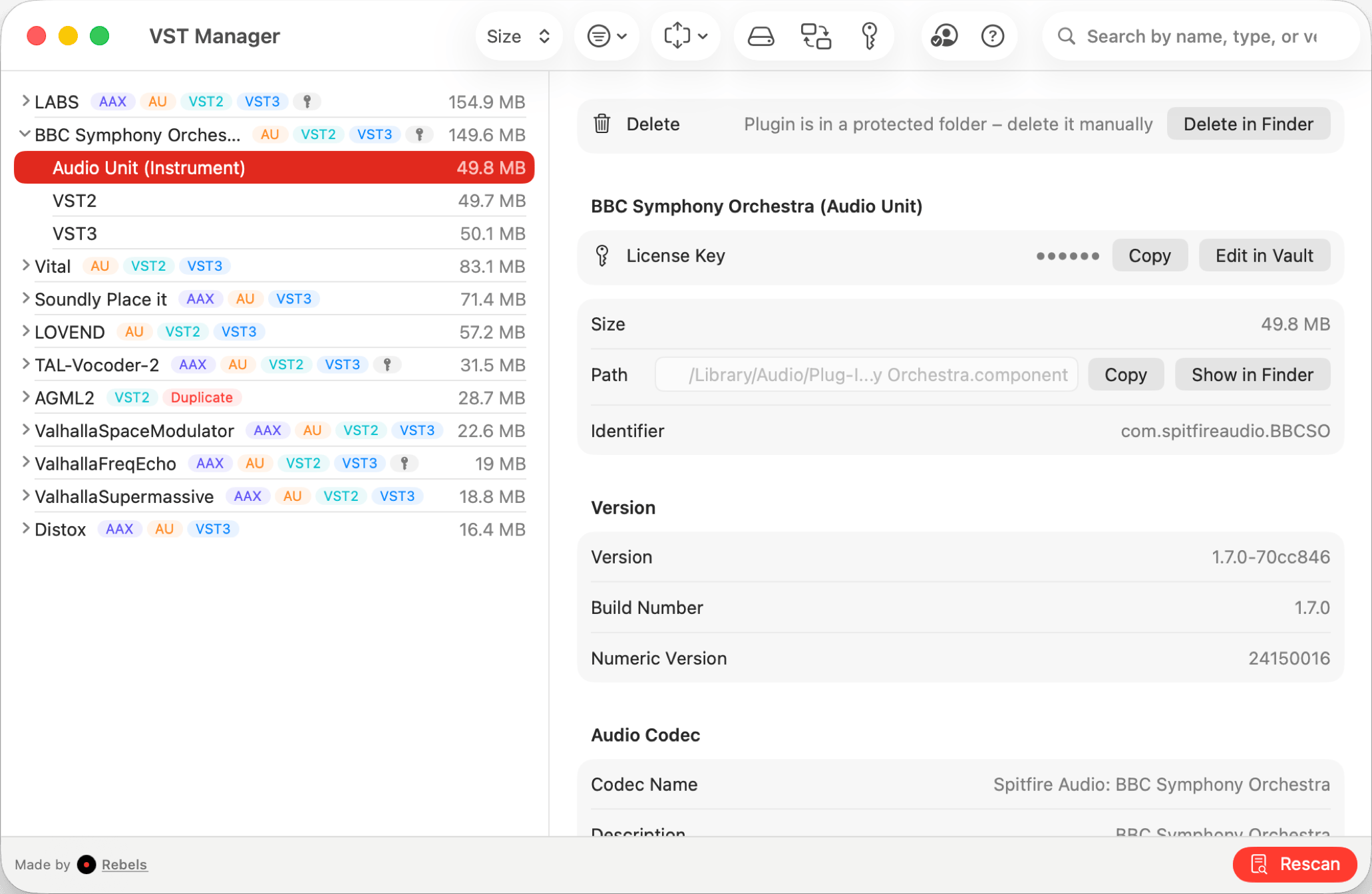
VST Manager solves the problem that native access tools and vendor managers don't touch: organizing and controlling all the plugins you already have, regardless of where they came from. It scans your system, gives you a unified view of every VST, VST3, and AU plugin installed, and lets you delete their files. If your DAW is scanning slowly because of outdated or redundant plugins clogging the path, this is where you fix it.
The ability to identify duplicates and outdated format versions is the feature that earns its price immediately for anyone with an older plugin library. It's common to have both a VST2 and VST3 version of the same plugin installed from different eras. Deleting the outdated copy is exactly the right behavior. You're not making an irreversible change; you're cleaning up what your DAW no longer needs.
It does not handle downloading new plugins. It's a manager for what's already on the system, not a store or delivery tool. That's the right scope for this kind of utility, but it's worth setting the expectation clearly if you're looking for an all-in-one solution.
Producers and engineers with large plugin collections who need vendor-independent organization, duplicate management, and selective enabling across their full installed library.
Owlplug (best for plugin discovery and installation)

Pros
- Completely free and open source
- Plugin discovery and installation from a community registry
- Cross-platform: Mac, Windows, and Linux
- Customizable plugin organization structure
Cons
- No license key management or duplicate detection
- Focused on discovery rather than auditing what's already installed
Owlplug approaches plugin management from the other direction. Rather than helping you manage what you already have, it helps you find and install new plugins. It connects to a community registry where developers publish their plugins, lets you browse and install directly, and supports customizable organization structures for how plugins are stored on your system.
It is fully open source with an active GitHub repository and a Discord community. The decentralized architecture means you can contribute plugins to the registry and install from third-party distribution services. For producers who are actively building a collection and want a centralized place to discover and manage installations, Owlplug handles that workflow well and costs nothing.
What it does not do is audit. There is no duplicate detection, no license key vault, no storage breakdown. If your plugin library is already large and the goal is to understand and clean up what you have rather than add more, Owlplug does not address that problem.
Producers on any platform who want a free, open-source tool for discovering and installing new plugins from a community registry.
Plugin Station (best for active plugin buyers who want everything)
Pros
- Everything VST Manager does, plus more
- Uninstall assistant for clean plugin removal
- Price comparison across plugin stores before you buy
- Out-of-date plugin notifications
Cons
- Subscription model: nearly $60 per year ongoing
- Perpetual license at $165 is tied to a single Mac, non-transferable
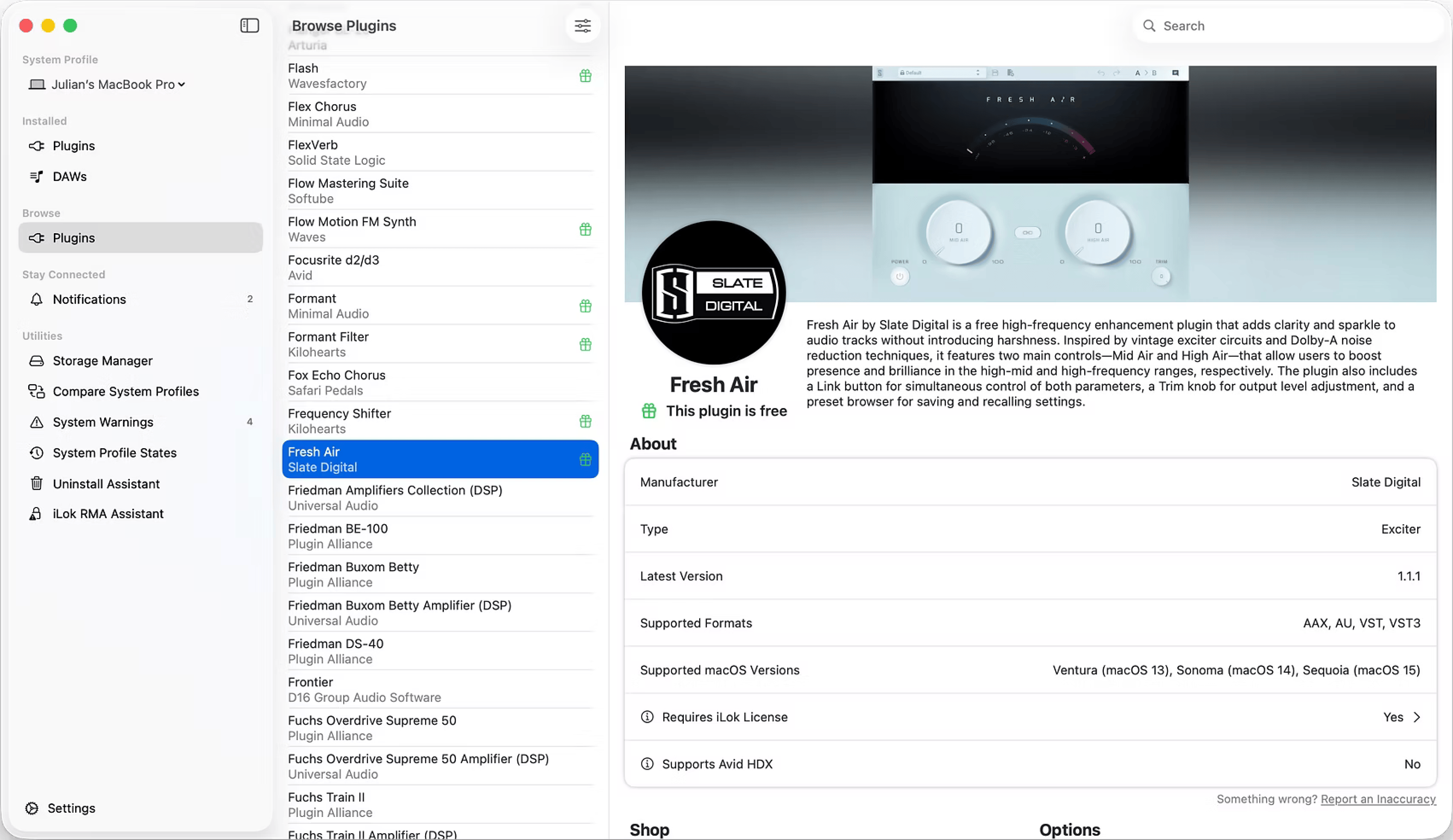
Plugin Station is the most feature-complete plugin manager available for Mac. It covers everything VST Manager does and adds three capabilities: an uninstall assistant for cleanly removing plugins, a price comparison tool that shows you the best price across multiple stores before you buy, and notifications when your installed plugins have updates available.
The uninstall assistant is genuinely useful. Plugin uninstallers are inconsistently provided by developers, and manually tracking down plugin files across multiple system directories is tedious. Having a guided removal flow built in is the kind of feature that gets used often enough to matter.
The pricing model is the hardest part to ignore. The subscription is $4.99 per month, compounding to nearly $60 per year. The perpetual option at $165 avoids the subscription but is locked to a single Mac and non-transferable. For software most producers run as an occasional utility, that is a significant ongoing cost compared to VST Manager's one-time $8.99.
Active plugin buyers who regularly add to their collection and want update alerts, price comparison across stores, and a guided uninstall tool.
What about free options?
Owlplug is free and handles plugin discovery and installation from its community registry across Mac, Windows, and Linux. Beyond that, free options in this category are limited. Most DAWs have their own internal plugin scanner, and some like Logic Pro and Ableton provide basic views of installed plugins. These aren't standalone managers, but for light management needs they're already there.
For diagnosing which plugins are installed and where, macOS's built-in system information includes an Audio Plug-ins section that shows AU components. It's not a management tool, but it's a useful reference that costs nothing.
What I actually use
VST Manager for the general library audit and license key management. It shows me what's installed, flags the duplicates, and lets me disable old VST2 versions that I've replaced with VST3 equivalents. DAW scan times noticeably improved after cleaning up that layer.
If you're actively building your collection and want a free discovery tool, Owlplug covers that side of the workflow. If you buy plugins regularly and want update notifications and price comparisons before committing, Plugin Station's model makes more sense. The right tool depends on where you are in the process: building a collection, auditing one you already have, or managing an active buying workflow are three different problems.