 Audio Tag Editor
 BPM Finder
 Live BPM Finder
 Key Finder
 Mix Maker
 Track Analyzer
 Transition Finder
 VST Manager
Most DJs build sets the same way: a mental shortlist accumulated over weeks, a rough idea of the arc, and then ten minutes of improvisation under pressure when the set starts. It works until it doesn't. Once the music gets more specific or the gigs get more important, having a structured pre-planned set, one where you've thought through the BPM progressions, the key transitions, and the energy arc, makes a real difference.
The challenge is that most DJ software treats set planning as an afterthought. Playlist management exists, but it's often buried inside a platform primarily designed for live performance. A few dedicated tools on Mac actually take set planning seriously as its own workflow. Here's what's worth using in 2026.
At a glance
The best DJ set planning apps for Mac
Mix Maker (best dedicated set planning)
Pros
- Purpose-built for set planning rather than performance
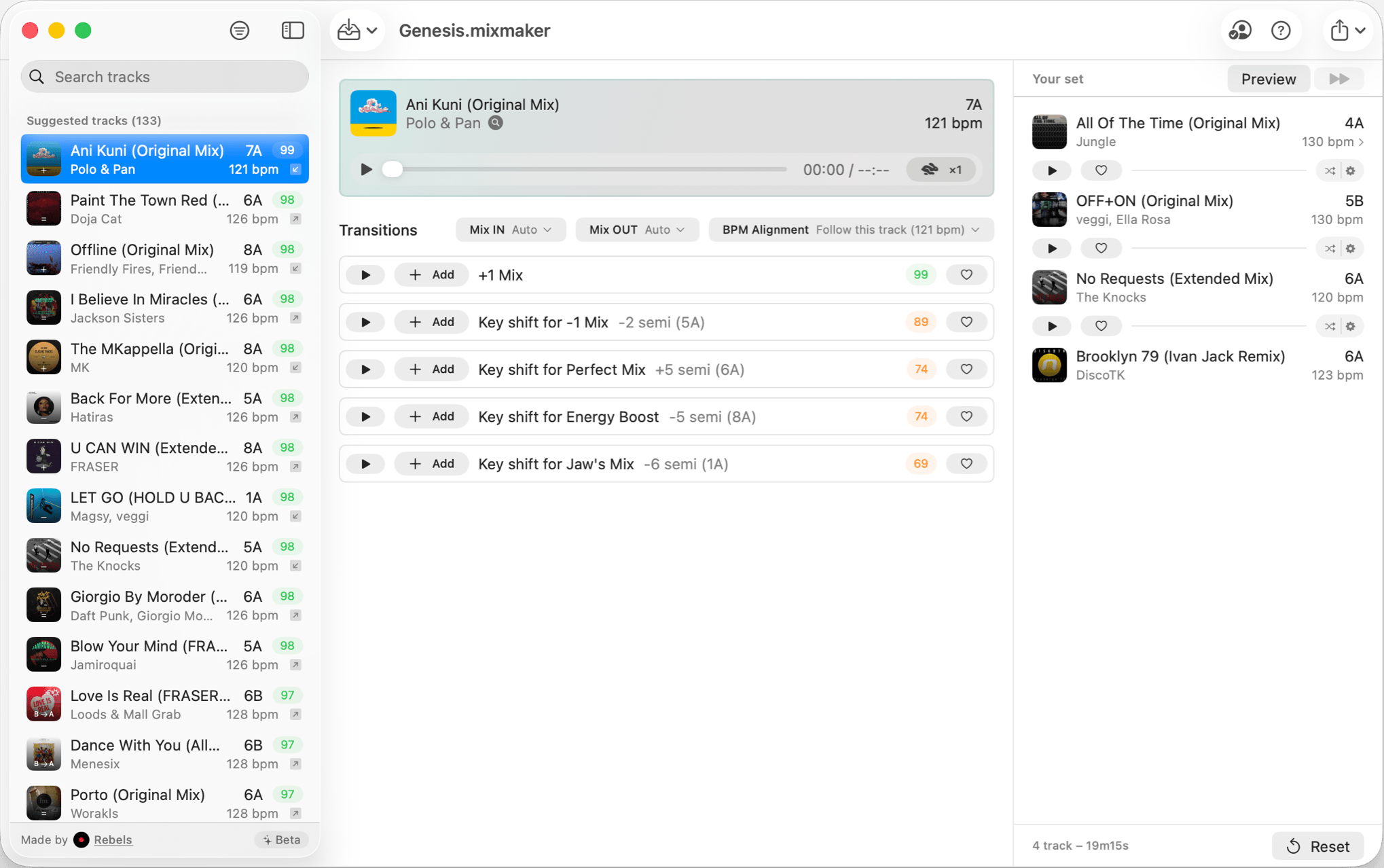
- Previews any transition in...less than 1 second!
- Visualizes BPM and key compatibility across a planned sequence
- Entirely offline with no account or subscription
Cons
- Mac-only, no iPhone or iPad version
- No live performance
Mix Maker does something the other tools in this comparison don't: it treats set planning as the primary workflow, not a secondary feature inside a performance platform. You bring in your tracks, arrange them into a sequence, and see how the BPM and key relationships look across the full planned arc of the set before you commit to anything.
The value of seeing those relationships visually is significant. A transition that sounds obvious in your head can look wrong on paper once you see the key incompatibility or BPM gap laid out in sequence. Planning a two-hour set from 125 to 135 BPM while staying harmonically sensible requires thinking through the logic of the whole set, not just the next track. Mix Maker is built around that kind of structural thinking.
It runs entirely offline with a one-time $9.99 purchase and no library setup required beyond pointing it at your music. It does not serve as a performance tool. It's a planning environment, not a DAW or DJ deck. That focus is what makes it good at the thing it's designed for, and it's also the clearest limitation for anyone wanting a combined planning-and-performance solution.
DJs who prepare structured sets in advance and want a dedicated Mac tool for planning track order, BPM progression, and harmonic flow.
Mixed In Key Pro (best for harmonic analysis and mashup exploration)
Pros
- Stem separation to isolate vocals and instruments for creative blends
- Key shifting to unlock mashup combinations across your library
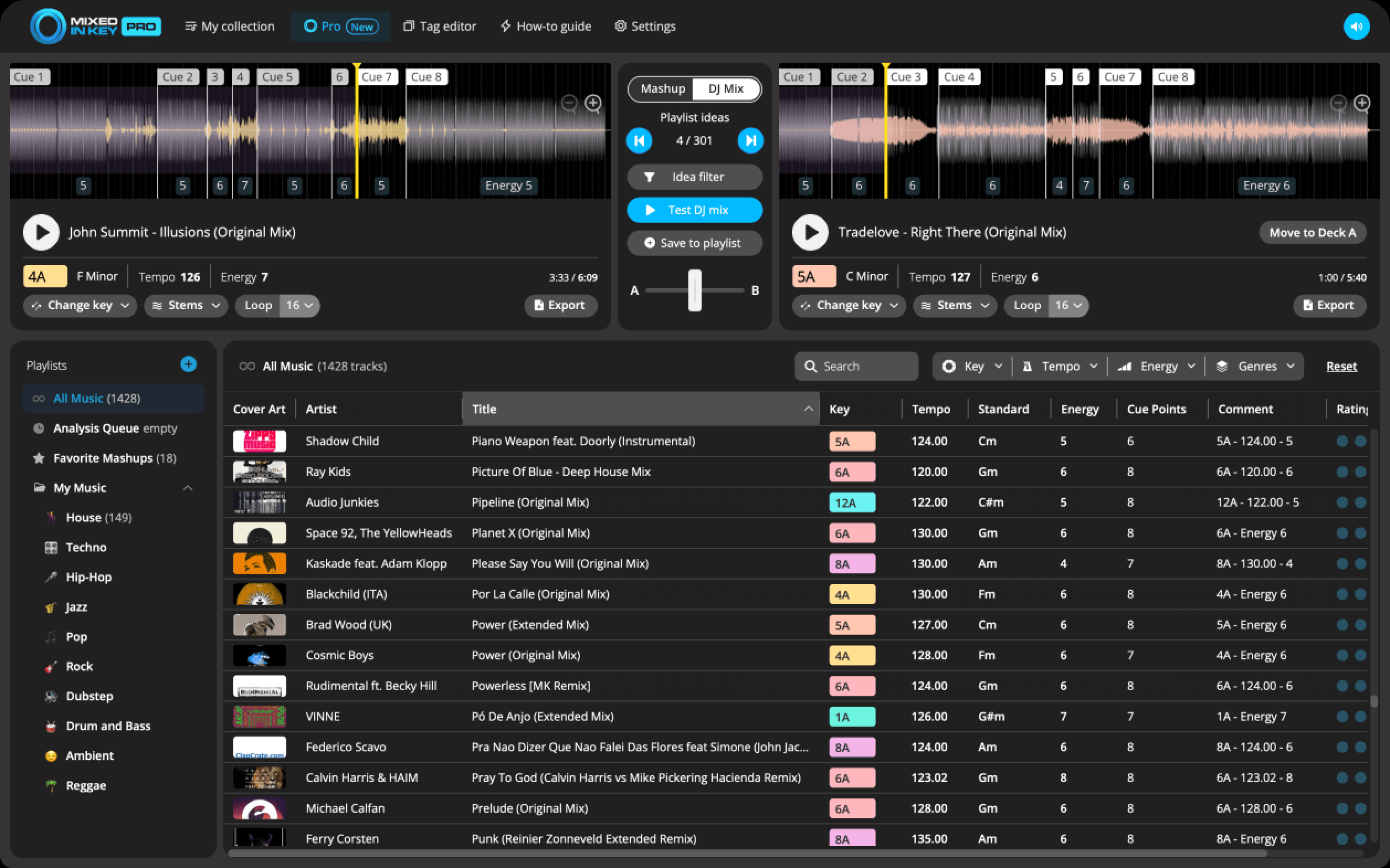
- DJ Mix Mode surfaces transition suggestions based on energy, tempo, and key
Cons
- Significantly more expensive than focused set planning tools
- Deeper feature set than most DJs need for straightforward pre-gig prep
Mixed In Key Pro is the professional tier of the industry-standard Mixed In Key platform, built for DJs who want to go beyond sequence planning into active mashup exploration. The DJ Mix Mode generates transition suggestions based on energy level, tempo, and key compatibility, helping you surface combinations across your library that manual browsing would miss.
The standout capability is the combination of stem separation and key shifting. Stem separation splits any track into its vocal and instrumental elements, opening up blending possibilities that are normally only available in a full DAW. Key shifting adjusts a track's key to expand the pool of harmonically compatible transitions. Together, these two features push the planning phase significantly beyond what a purely organizational tool provides.
Where Mixed In Key Pro differs from Mix Maker is scope. Mix Maker is designed for structured set sequencing: get the order right, check BPM flow and harmonic compatibility, arrive at the gig prepared. Mixed In Key Pro is for DJs who are actively exploring creative combinations and building sets around mashup ideas rather than straightforward playlist logic. At $99, that depth needs to be part of your workflow to justify the cost.
DJs who build sets around harmonic complexity and mashup exploration, want stem separation and intelligent transition suggestions as part of their planning process.
Rekordbox (best for CDJ preparation and structured library management)
Pros
- Industry standard for CDJ preparation, accepted at most clubs worldwide
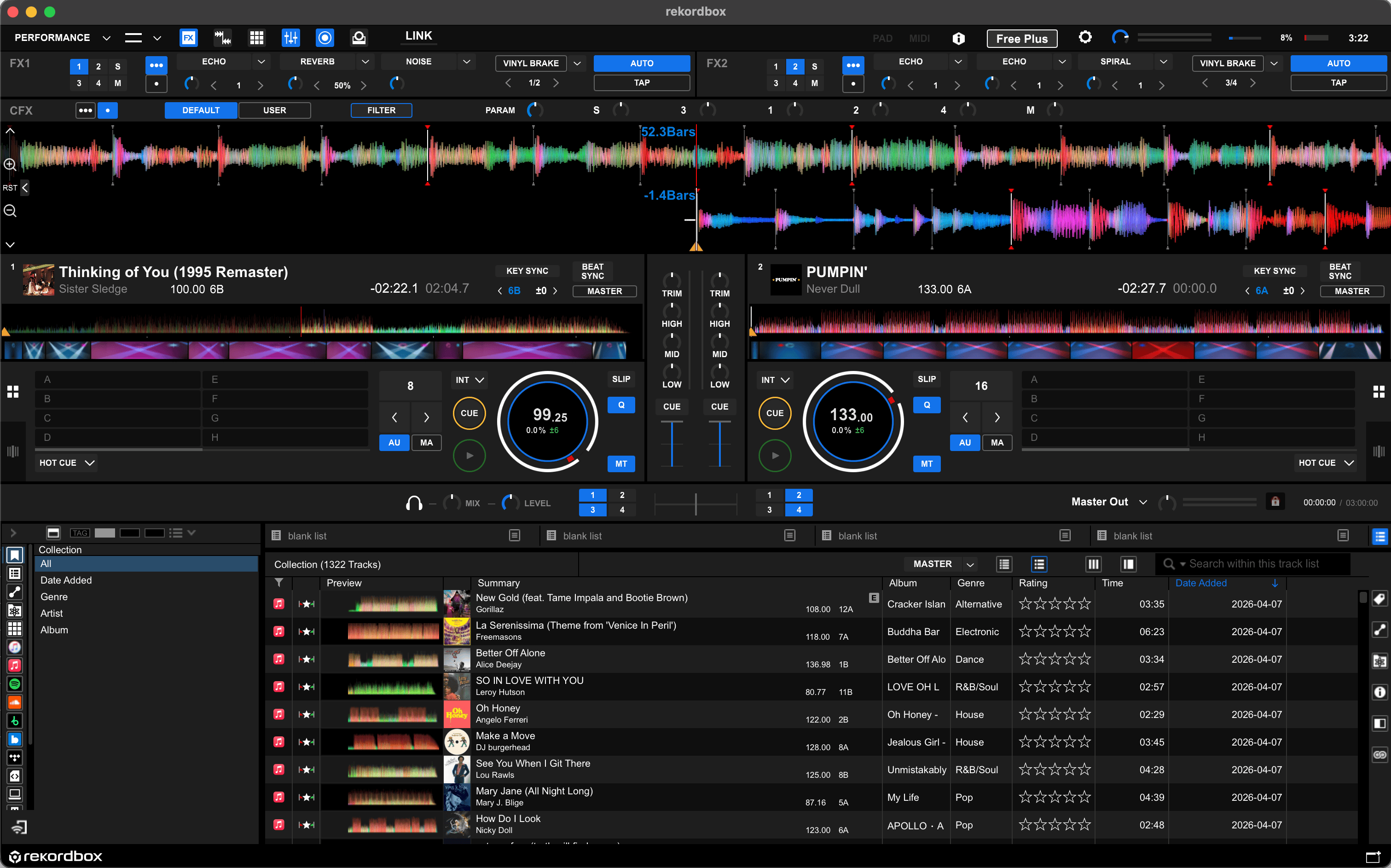
- BPM, key, and energy data visible while building playlists
- Deep library management with cue points, memory points, and loops
Cons
- Set planning is a secondary feature inside a performance platform
- Heavier application than dedicated planning tools
- Full performance features require a subscription
Rekordbox is the default standard for DJs who play on Pioneer CDJ systems, which covers most professional club setups worldwide. Its playlist management and track analysis features are part of the same environment you'd use to export a USB drive for a CDJ gig, so for a specific class of DJ workflow, the set planning and the performance preparation happen in the same tool.
The analysis layer is solid. Rekordbox shows BPM and key while you're building playlists, and its energy level view gives a rough sense of track intensity across a planned sequence. This is enough for many working DJs to do meaningful pre-set planning without reaching for a separate tool.
Where Rekordbox falls short as a pure planning tool is focus. It's a full DJ platform with a performance mode, deck control, hardware integration, and a subscription gate on many of its advanced features. Set planning is one capability inside a large system, not the core design intent. If you're already preparing USB drives in Rekordbox for CDJ gigs, the planning features are worth using because they're already there. If you're not in that ecosystem, it's a lot of platform overhead for a planning workflow.
CDJ-focused DJs who are already using Rekordbox for USB export and want set planning integrated into the same environment.
What about free options?
Rekordbox is free for library analysis and export, which makes it the most capable no-cost option if you're comfortable with its scope. For finding compatible tracks based on key relationships, Rebels also offers a free Camelot Wheel tool that shows which keys mix harmonically. It's a useful reference when you're planning transitions and need to check compatibility quickly without opening a full platform.
What I actually use
Mix Maker for set structure planning before I get to the decks. The workflow that works for me is spending twenty or thirty minutes the day before a gig laying out the planned arc, checking where the BPM increases and where the key transitions need care, and identifying the two or three spots where I want backup options. Arriving at a gig with that structure already thought through is worth every minute of preparation.
I also keep a separate tool specifically for finding compatible transitions between tracks when I'm not sure how two tracks will work together. Rekordbox stays in the workflow for USB prep before CDJ gigs, but I think of it as an export tool rather than a planning tool. The planning happens before I ever open it.